Reveal barriers. See your organization through a different lens.
We find the physical, digital, communication, and policy barriers that checklists miss, then help you fix them in a sensible order.
What changes when you bring PRISM in.
An audit is where it starts. Here's what it can change across your whole organization.

I've spent most of my life navigating places that weren't built for me. That's what I bring to every audit: the knowledge of the barriers people live with but rarely report, and practical ways to remove them.
Hidden barriers come to light
You hear about barriers through complaints, if you hear about them at all.
We find, explain and rank them, including the ones nobody has reported.
A better experience for everyone
People work around problems, ask for help, or quietly go elsewhere.
Visitors, clients, staff and families find, reach and use what you offer, on their own terms.
Change that lasts
Accessibility sits with one person, or with no one.
Clear owners, a confident team, and a plan people understand and support.
Budget where it matters most
Fixes get funded in whatever order they're noticed.
A priority order that puts each dollar where it makes the biggest difference.
Confidence about your obligations
It's unclear what the AODA, the building code or your funders expect.
You know what applies to you, and you have the evidence to show it.
More people through your door
Customers, clients and talent you never knew you were missing.
A wider audience, a stronger team, and a reputation that reflects your values.
One organization. Many dimensions of access.
Choose a dimension to see the questions we ask.
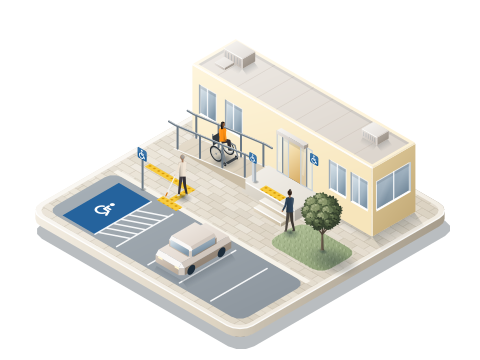
Physical spaces
Entrances, routes, washrooms, signage, lighting, and emergency features.
- Can someone find the accessible entrance without asking for help?
- Do lighting, contrast, and signs support finding your own way?
- Can everyone use the emergency procedures?
Workplaces
Roles, tools, spaces, and the accommodation process.
- Is asking for an accommodation clear, quick, and respectful?
- Do hiring and onboarding create hidden barriers?
- Can the whole team use the tools they're given?
Programs & services
How people find out about, sign up for, and take part in what you offer.
- Can people register in more than one way?
- Do frontline staff feel ready to support different needs?
- Where do people give up, and why?
Communications
Documents, signs, public information, meetings, and events.
- Is key information in plain language and alternate formats?
- Do meetings offer captions, ASL, or other supports?
- Can people ask for what they need, easily?
Digital
Websites, forms, PDFs, and online services. Ontario requires WCAG 2.0 AA of public sector organizations and those with 50 or more employees; we test to WCAG 2.2 AA, which covers it.
- Can your forms be completed with a keyboard or screen reader?
- Are PDFs tagged and readable?
- How close are you to WCAG 2.2 AA?
Policy & culture
Policies, training, purchasing, and who is accountable.
- Is accessibility considered when you buy products and services?
- Who owns accessibility outcomes, and how are they measured?
- Do people trust the process enough to use it?
Five stages, and support after the report.
From the first conversation to answers while your team makes changes.
Discover
Your goals, spaces, people, and limits.
Assess
Site visits, documents, digital, and practice.
Analyze
Impact, risk, and cost for each finding.
Recommend
What to fix first, and how.
Support
Answers while your team makes changes.
What you'll have at the end.
A report written to be used, not shelved, and a team that knows what to do next.
- A short summaryWhat's working and the main barriers, in plain language your leadership or council can read.
- Findings by areaWith photos, locations and the standard or benchmark each one relates to.
- Recommendations ranked by priorityWeighed by impact on people, safety, how often people meet the barrier, requirements, cost and timing.
- An action planQuick wins to tackle now and larger changes to bring into budgets and your multi-year accessibility plan.
- A walkthrough with your teamWe go through the findings together, and answer questions while you make changes.
How long it takes
- One small site
- Half a day to a day on site. Your report follows in about two to four weeks.
- Larger or several sites
- Often six to twelve weeks from first meeting to final report, especially with digital testing and policy review.
What shapes the cost
- How many sites, and how large they are
- Which areas are in scope: spaces, workplaces, programs, communications, digital, policy
- How many web pages, forms and documents we test
- Travel, if your sites are spread out
Your proposal sets out the scope, timeline and cost before any work begins. No obligation. An audit isn't a legal opinion or a certification: it shows where barriers are and how to remove them.
More than a compliance checklist.
Codes set the minimum. Explore the lobby to see what else we ask.
A checklist asks
Is the doorway wide enough?
PRISM also asks
Can someone find it, reach the button, and open it on their own?
See all five as a table
| A checklist asks | PRISM also asks |
|---|---|
| Is the doorway wide enough? | Can someone find it, reach the button, and open it on their own? |
| Is the kiosk screen at a reachable height? | Can someone who is blind check in without asking for help? |
| Is there a lowered counter section? | Is it kept clear, and are staff ready to serve someone seated or signing? |
| Is there an accessible washroom? | Is it signed from the entrance, kept clear, and usable without help? |
| Is an accessibility policy posted? | Do people know how to use it, and do they trust it? |
Evidence informed. Human centred.
We read every requirement through how people actually move, communicate, and take part. Choose a standard to see how we use it.
A national rating of meaningful access in buildings and sites, scored on site by trained professionals.
How we use it: We plan toward a rating with you. A result of 60–79%, or Gold, can support MLI Select accessibility points.
Adapted to your organization and your people.
Some of the places we walk through, by sector.
Universities & schools
Businesses
Developers & property teams
Healthcare
Non-profits
Before you book.
Straight answers to what people usually ask first.
Is an audit the same as a compliance check?
No. We check against the relevant standards, and we also ask whether people can actually find, reach and use what you offer. A space can meet a minimum and still not work well.
Which standards do you work with?
Including RHFAC, CSA B651, the AODA and its standards, the Accessible Canada Act, the Ontario Building Code where relevant, WCAG 2.2 and Universal Design principles.
Can you look at our website and documents?
Yes. Digital touchpoints such as websites, online forms and PDFs can be part of an assessment, reviewed against WCAG 2.2 and how real people use them.
How much does a project cost?
It depends on what's in scope: how many sites and how large they are, which areas we review (spaces, programs, communications, digital, policy), how many web pages and documents we test, and travel. For training, it depends on the format, preparation and audience. After the free discovery call you'll receive a proposal with a clear scope, timeline and cost, with no obligation to go ahead.
Do you work in person or virtually?
Both. Site assessments happen in person; planning, reviews, training and follow-up can happen in person or virtually.
See what others overlook.
Uncover barriers, understand their impact, and move forward with practical, people-centred solutions. Pair your audit with team training so the changes last.
Book an audit consultation